
Appearance
ASSET ACCOUNTING
Accounting Configuration Guide
Configure and verify the asset accounting chain before allowing acquisition, depreciation, and disposal to post.
Configuration order
This is configuration guidance, not tenant test data
Select the current tenant's approved COAs, sub-ledgers, business units, currencies, and users. Do not copy numeric IDs or account codes from another company or environment. Complete Asset Setup first.
1. Rules before creation
| Rule | What it means | Why it matters |
|---|---|---|
| Search before creating | Search by visible name and code first. | Prevents duplicate account structures, rules, and disposal methods. |
| Do not copy IDs between companies | Select records in the current company. | COA, sub-ledger, business-unit, currency, asset, and rule IDs are tenant-specific. |
| One reusable rule per action | Reuse Asset Acquisition, Asset Depreciation, and Asset Disposal. | Avoids duplicating accounting logic for every asset type. |
| Concrete COAs are required | Assign real approved COAs to posting details. | The resolver reads coa_id; symbolic names or tags alone do not create journal lines. |
| Approve every dependency | Approve COAs, details, links, mappings, and asset records where required. | Posting filters for approved rows. |
| Configure one currency scope | Set currency only when company policy requires it. | Prevents a more-specific mapping from overriding the general mapping unexpectedly. |
| Test before live use | Post one acquisition, one depreciation, and one disposal in a controlled environment. | Proves that the COAs, handler, mapping, and journal are connected. |
2. Configuration order
| Order | Setup layer | User action | Completion evidence |
|---|---|---|---|
| 1 | Account foundation | Select the existing ASSET, LIABILITY, EQUITY, INCOME, and EXPENSE foundations. | Each required foundation is active. |
| 2 | Major accounts | Create or reuse Fixed Assets, Accumulated Depreciation, Asset Expenses, Disposal Results, and related groups. | Each major account has the correct foundation. |
| 3 | Account headers | Create or reuse class headers such as Computer Equipment, Motor Vehicles, Buildings, and Furniture. | Each header is under the correct major account. |
| 4 | Chart of accounts | Create the actual posting COAs and parent-child relationships. | Each COA is active, approved, and reportable. |
| 5 | Sub-ledgers | Create sub-ledgers only where transaction-level detail is required. | Each sub-ledger belongs to the selected COA and currency. |
| 6 | Disposal methods | Create or reuse the five standard disposal routes. | Each route is available and active once. |
| 7 | GL posting headers | Retain one reusable header for each supported lifecycle. | Code, mode, channels, and approval are correct. |
| 8 | Posting details | Add one debit and one credit detail for each supported header. | Every detail has a real approved COA. |
| 9 | Detail bindings | Attach the matching asset resolver to each detail. | Resolver code and binding are approved. |
| 10 | Asset mapping | Map asset, product, or asset type plus event to the reusable header. | Mapping resolves for the target business unit and date. |
| 11 | Runtime proof | Create and post representative asset events. | Journal lines balance and use intended accounts. |
3. Accounting foundation
These are accounting roles, not new tenant records to create blindly. Select the existing foundation that matches the company chart.
| Foundation | Normal balance | Asset-module use | Do not use it for |
|---|---|---|---|
| ASSET | Debit | Asset cost, CIP, disposal receivable, bank/cash, and contra-asset balances. | Depreciation expense or disposal income. |
| LIABILITY | Credit | Acquisition clearing, supplier payable, lease liability, and approved funding obligations. | Asset cost. |
| EQUITY | Credit | Revaluation reserve or another approved equity movement. | Ordinary depreciation. |
| INCOME | Credit | Gain on disposal or approved asset income. | Asset cost. |
| EXPENSE | Debit | Depreciation, impairment, disposal loss, and maintenance expense. | Accumulated depreciation balance. |
4. Major accounts and headers
Create a major account only when an equivalent active record is not already present.
| Major account | Foundation | Role in the asset lifecycle |
|---|---|---|
| Fixed Assets | ASSET | Groups original cost of buildings, vehicles, equipment, furniture, software, and other approved classes. |
| Construction in Progress | ASSET | Holds approved project cost before the asset is ready for use. |
| Accumulated Depreciation | ASSET | Groups contra-asset balances created by depreciation. |
| Accumulated Impairment | ASSET | Groups contra-asset balances created by impairment. |
| Asset Clearing and Payables | LIABILITY | Groups acquisition funding and clearing accounts. |
| Asset Expenses | EXPENSE | Groups depreciation, impairment, maintenance, and disposal losses. |
| Asset Disposal Results | INCOME / EXPENSE | Groups gains and losses from retiring assets. |
| Revaluation Reserve | EQUITY | Holds approved upward revaluation surplus. |
Open: Accounting -> Setup -> Chart of Accounts -> Create Account Header
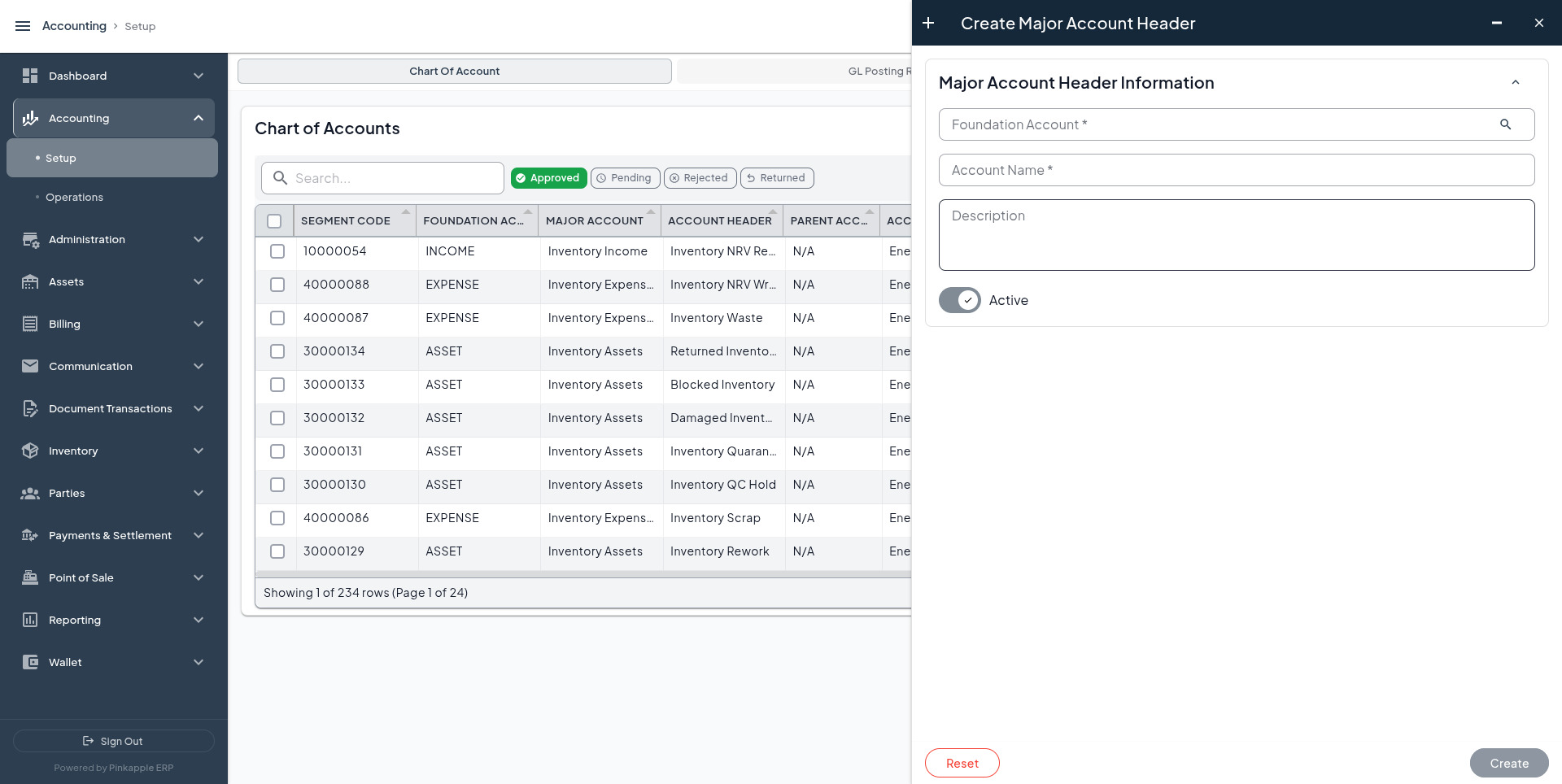
Use one header for a class of assets when the reporting policy groups that class together. Useful names include Buildings, Motor Vehicles, Computer Equipment, Furniture and Fittings, Plant and Machinery, Software and Intangibles, and Construction in Progress.
5. Chart of accounts
Open: Accounting -> Setup -> Chart of Accounts -> Create Chart of Account
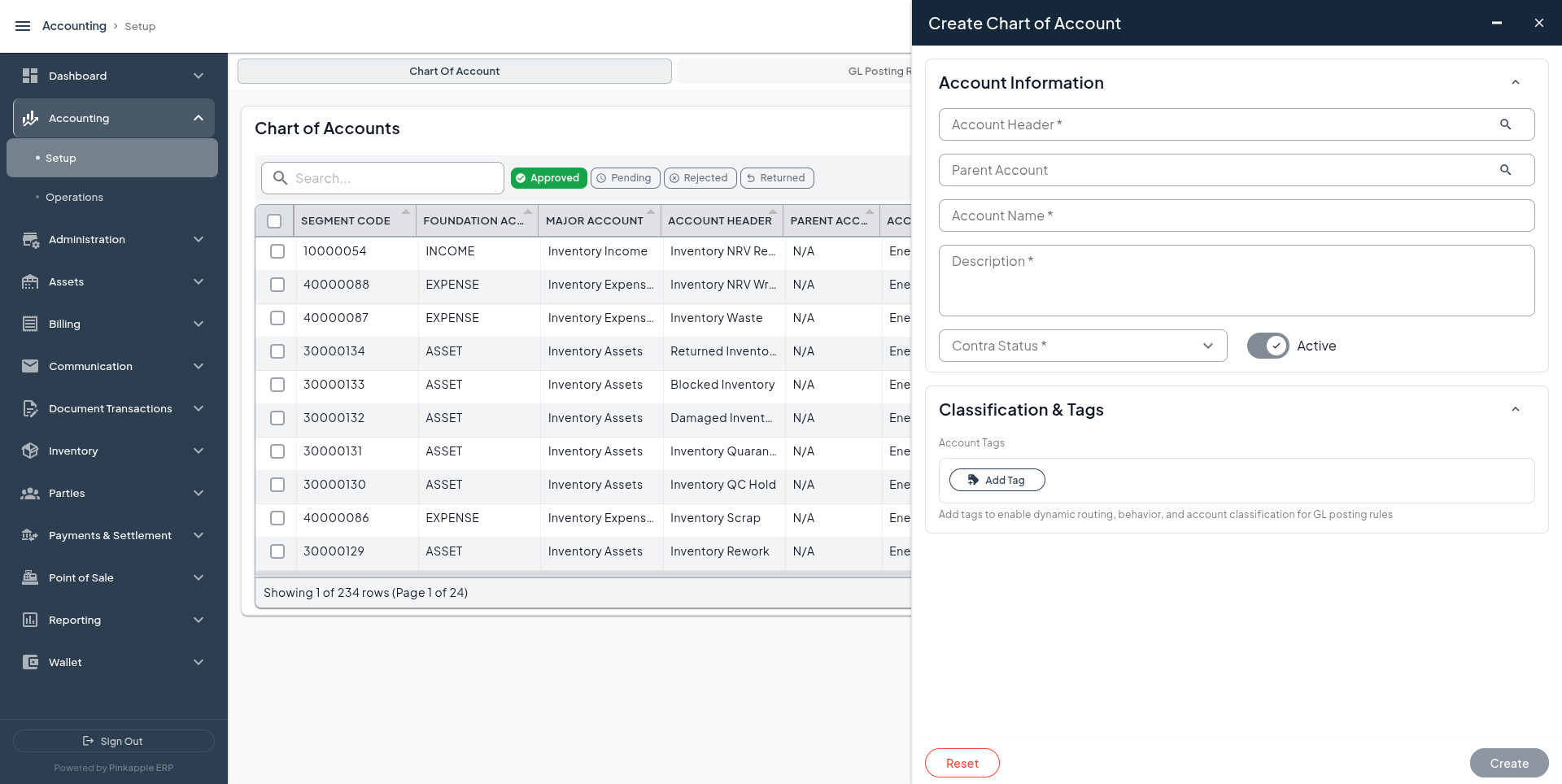
| Account purpose | Search for or create | Foundation | Normal balance | Parent header |
|---|---|---|---|---|
| Asset cost | Fixed Assets - Buildings | ASSET | Debit | Buildings |
| Asset cost | Fixed Assets - Motor Vehicles | ASSET | Debit | Motor Vehicles |
| Asset cost | Fixed Assets - Computer Equipment | ASSET | Debit | Computer Equipment |
| Asset cost | Fixed Assets - Furniture and Fittings | ASSET | Debit | Furniture and Fittings |
| Asset cost | Fixed Assets - Plant and Machinery | ASSET | Debit | Plant and Machinery |
| Asset cost | Fixed Assets - Software and Intangibles | ASSET | Debit | Software and Intangibles |
| Work in progress | Construction in Progress | ASSET | Debit | Construction in Progress |
| Contra-asset | Accumulated Depreciation - Fixed Assets | ASSET | Credit | Accumulated Depreciation |
| Contra-asset | Accumulated Impairment - Fixed Assets | ASSET | Credit | Accumulated Impairment |
| Acquisition source | Asset Acquisition Clearing | LIABILITY or approved clearing foundation | Credit | Asset Clearing and Payables |
| Acquisition source | Asset Purchase Payable | LIABILITY | Credit | Asset Clearing and Payables |
| Expense | Depreciation Expense - Fixed Assets | EXPENSE | Debit | Asset Expenses |
| Expense | Impairment Loss - Fixed Assets | EXPENSE | Debit | Asset Expenses |
| Expense | Asset Maintenance Expense | EXPENSE | Debit | Asset Expenses |
| Disposal proceeds | Asset Disposal Receivable | ASSET | Debit | Asset Disposal Results or current assets |
| Disposal proceeds | Bank - Asset Disposal or Cash - Asset Disposal | ASSET | Debit | Bank or Cash |
| Disposal result | Gain on Disposal of Fixed Assets | INCOME | Credit | Asset Disposal Results |
| Disposal result | Loss on Disposal of Fixed Assets | EXPENSE | Debit | Asset Disposal Results |
| Revaluation | Revaluation Reserve - Fixed Assets | EQUITY | Credit | Revaluation Reserve |
For each account, confirm active status, approval, business-unit scope, currency, and parent. The readable name helps the user; the selected COA is what the posting detail uses.
6. Sub-ledgers and tags
| Configuration | When to use it | Rule |
|---|---|---|
| Sub-ledger under asset-cost COA | The company needs class or transaction detail below the COA. | Select the parent COA first, then the sub-ledger. |
| Sub-ledger under depreciation expense | Depreciation must be analysed by branch, class, or cost centre. | Do not attach a sub-ledger from a different COA. |
| Static COA detail | The same account is correct for every event in the selected scope. | Set the actual COA on the detail and approve it. |
| Domain-resolved detail | The asset resolver should return the selected rule's concrete lines. | The current resolver still requires coa_id on the detail. |
| Tag-resolved detail | Only when a verified tag resolver exists for that asset line. | Do not use an event tag as a substitute for COA assignment. |
Existing asset handlers
| Handler code | Procedure | Supported lifecycle | What it does |
|---|---|---|---|
ASSET.ACQUISITION.RESOLVE | asset_acquisition_resolver | Acquisition | Reads the selected rule and emits approved debit and credit lines with concrete COAs. |
ASSET.DEPRECIATION.RESOLVE | asset_depreciation_resolver | Depreciation | Reads the selected rule and emits approved debit and credit lines with concrete COAs. |
ASSET.DISPOSAL.RESOLVE | asset_disposal_resolver | Disposal | Reads the selected rule and emits approved debit and credit lines with concrete COAs. |
7. Reusable GL posting rules
Open: Accounting -> Setup -> GL Posting Rules -> Create GL Posting Rule
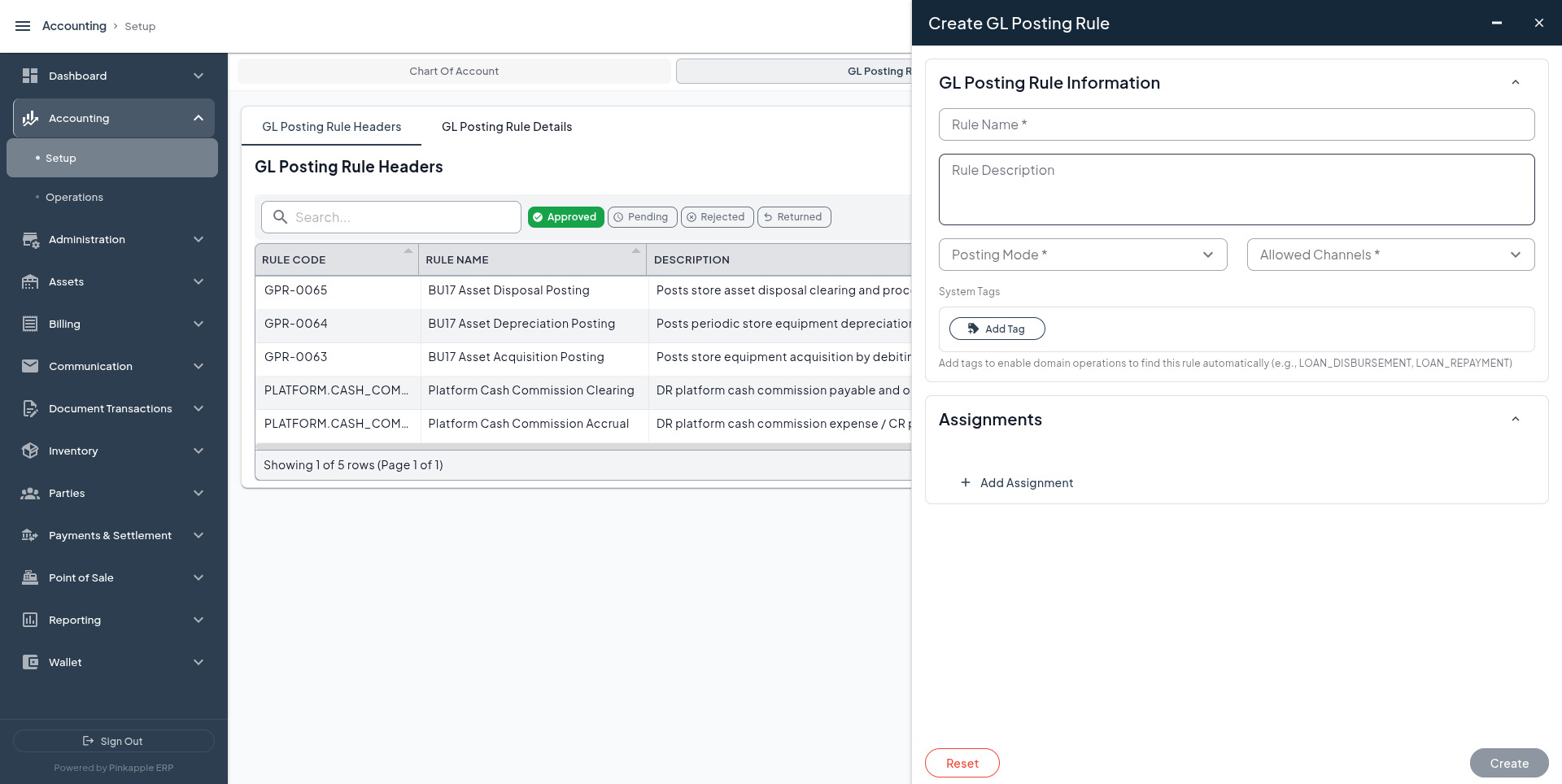
| Rule code | Rule name | Event | Posting mode | Allowed channels | Handler |
|---|---|---|---|---|---|
ASSET.ACQUISITION | Asset Acquisition | ACQUISITION | SYSTEM | BACKOFFICE, API, SYSTEM | ASSET.ACQUISITION.RESOLVE |
ASSET.DEPRECIATION | Asset Depreciation | DEPRECIATION | SYSTEM | BACKOFFICE, API, SYSTEM | ASSET.DEPRECIATION.RESOLVE |
ASSET.DISPOSAL | Asset Disposal | DISPOSAL | SYSTEM | BACKOFFICE, API, SYSTEM | ASSET.DISPOSAL.RESOLVE |
Keep the asset class in the mapping or account resolution, not in the reusable rule name. Use system tags only when they are verified asset lifecycle tags; tags do not replace COA assignment.
Posting rule details
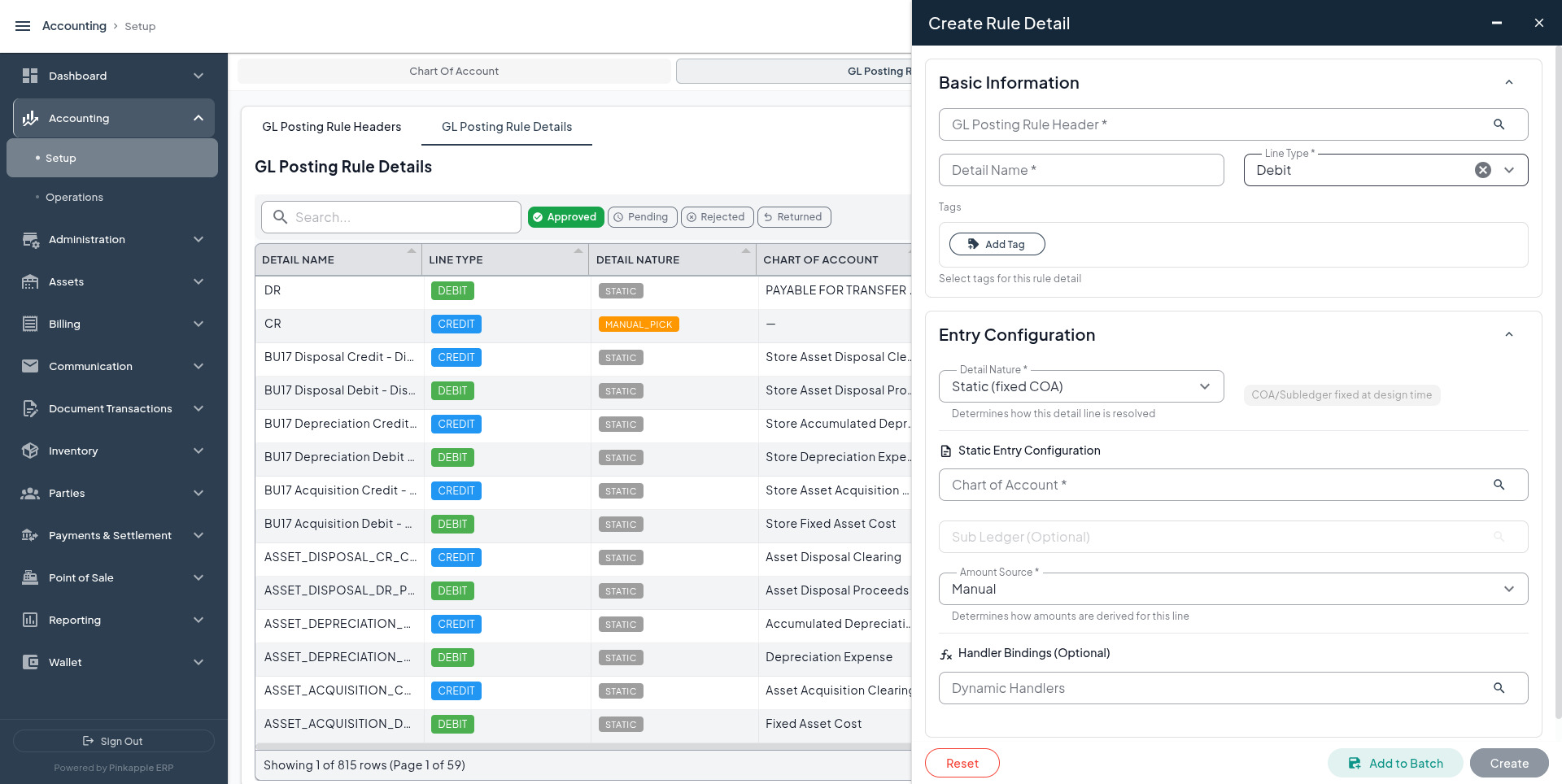
| Header | Detail name | Line type | Detail nature | Amount source | COA to assign |
|---|---|---|---|---|---|
| Asset Acquisition | ASSET_ACQUISITION_DR_ASSET_COST | Debit | DOMAIN_RESOLVED | SYSTEM | Fixed asset cost COA |
| Asset Acquisition | ASSET_ACQUISITION_CR_CLEARING | Credit | DOMAIN_RESOLVED | SYSTEM | Clearing, payable, bank, or cash COA |
| Asset Depreciation | ASSET_DEPRECIATION_DR_EXPENSE | Debit | DOMAIN_RESOLVED | SYSTEM | Depreciation expense COA |
| Asset Depreciation | ASSET_DEPRECIATION_CR_ACCUMULATED | Credit | DOMAIN_RESOLVED | SYSTEM | Accumulated depreciation COA |
| Asset Disposal | ASSET_DISPOSAL_DR_PROCEEDS | Debit | DOMAIN_RESOLVED | SYSTEM | Bank, cash, or disposal receivable COA |
| Asset Disposal | ASSET_DISPOSAL_CR_CLEARING | Credit | DOMAIN_RESOLVED | SYSTEM | Disposal clearing or proceeds COA |
Bind the same resolver to both details for one rule. Set the real COA, required sub-ledger, amount source SYSTEM, and APPROVED status. Do not bind different resolvers to the two sides of one rule.
Read back financial events
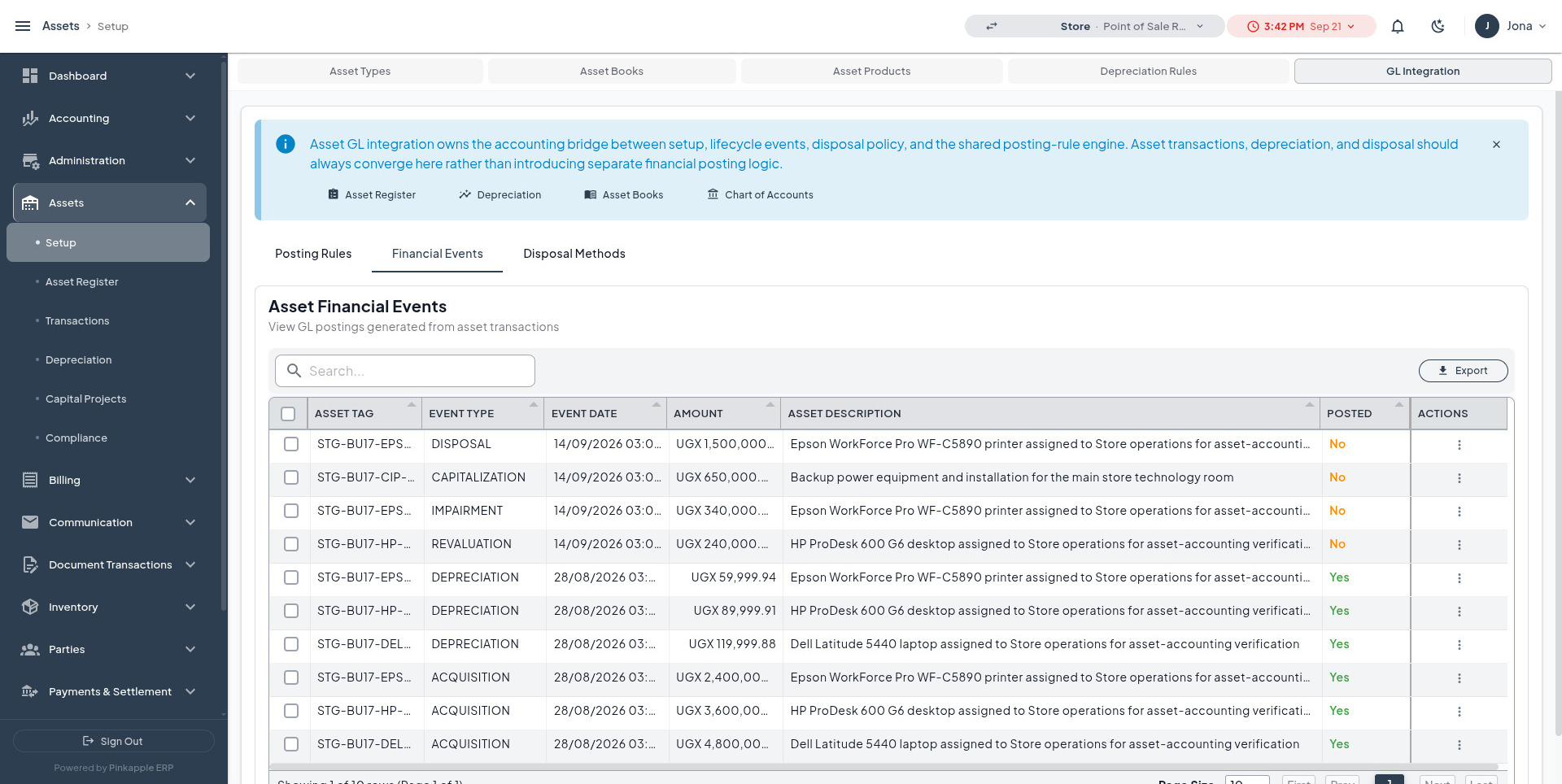
After a lifecycle action, use Assets -> Setup -> GL Integration -> Financial Events to confirm the event, amount, asset description, and posted state before opening the journal.
8. Asset posting-rule mapping
Open: Assets -> Setup -> GL Integration -> Create Asset Posting Rule
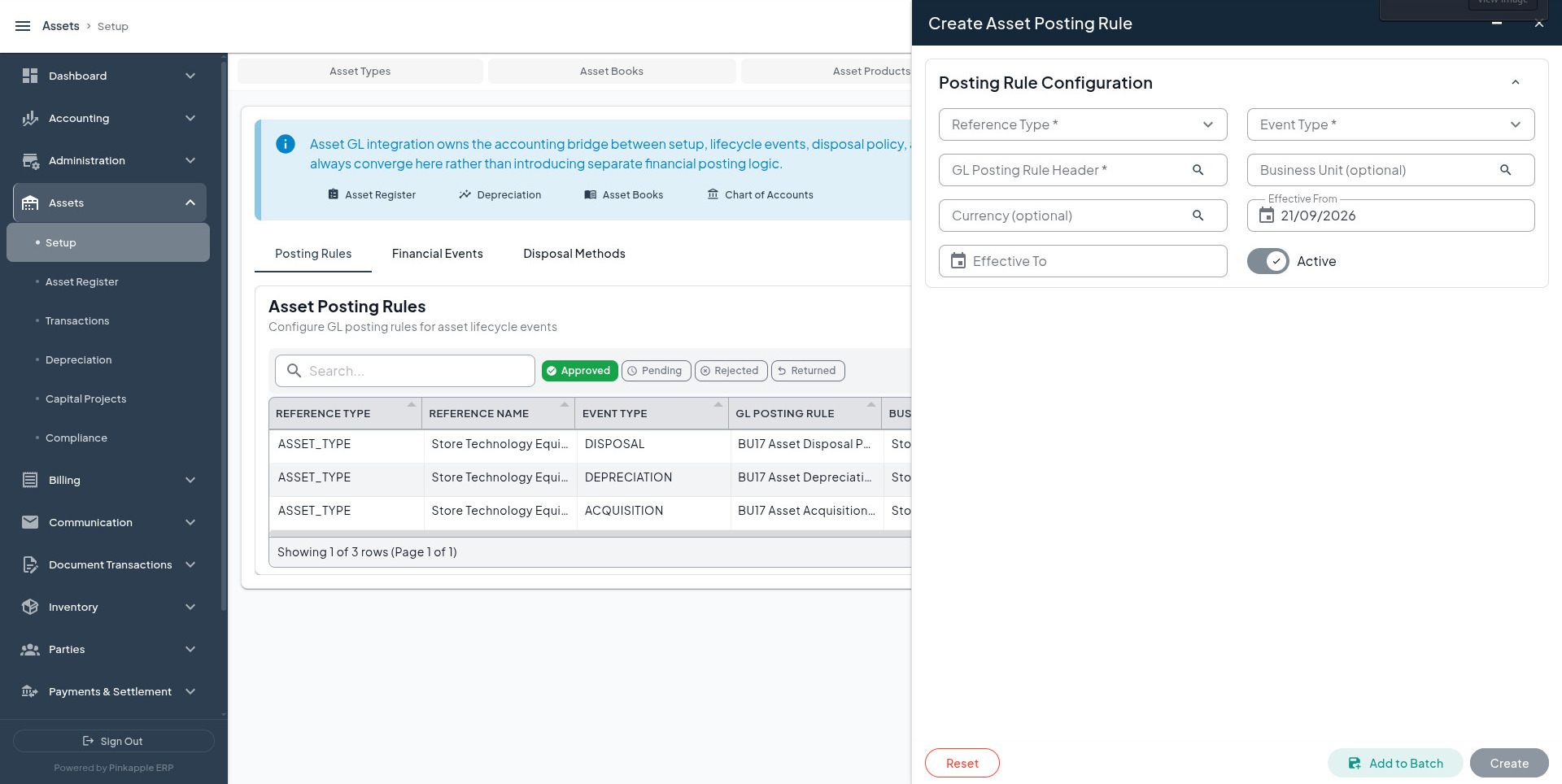
| UI field | Acquisition example | Depreciation example | Disposal example |
|---|---|---|---|
| Reference type | ASSET_TYPE, ASSET_PRODUCT, or ASSET | Same | Same |
| Reference | Buildings asset type or Toyota Hilux product | Same approved scope | Same approved scope |
| Event type | ACQUISITION | DEPRECIATION | DISPOSAL |
| GL posting rule header | Asset Acquisition | Asset Depreciation | Asset Disposal |
| Business unit | Only when branch-specific | Only when required | Only when required |
| Currency | Only when currency-specific | Only when required | Only when required |
| Effective from/to | Approved policy window | Approved policy window | Approved policy window |
| Active | Enabled after verification | Enabled after verification | Enabled after verification |
| Approval | APPROVED | APPROVED | APPROVED |
The resolver searches the approved mapping for asset, then product, then asset type, while applying business-unit, currency, and effective-date filters. Keep one unambiguous active mapping for each scope, event, and window.
9. Disposal methods
Open: Assets -> Setup -> GL Integration -> Disposal Methods
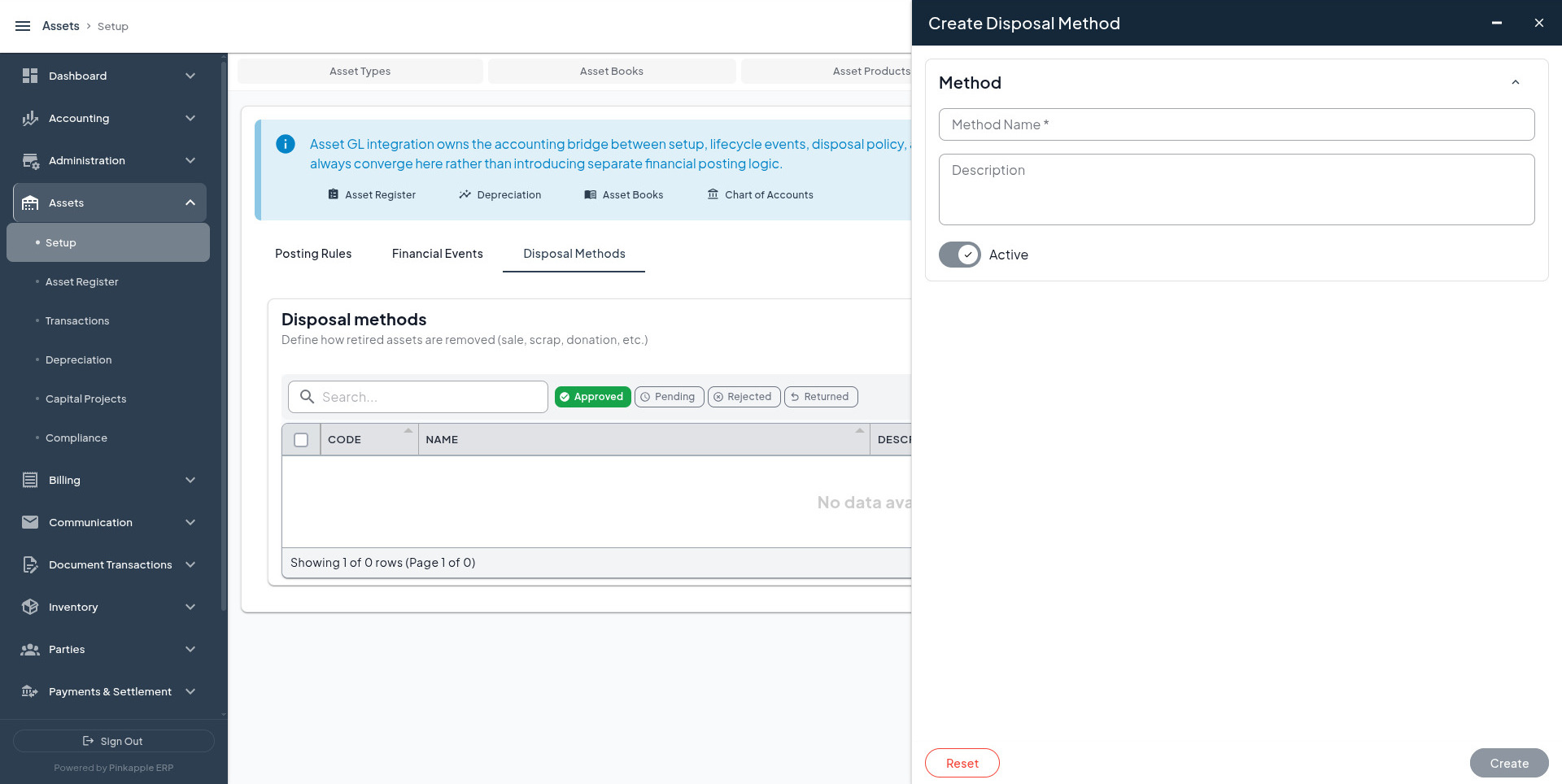
| Code | Method name | Use when | Proceeds account | Additional consideration |
|---|---|---|---|---|
DM001 | Public Auction | The asset is sold through a public auction. | Bank, cash, or disposal receivable. | Record approved auction proceeds and derecognition evidence. |
DM002 | Sale To Third Party | The asset is sold directly to an external buyer. | Bank, cash, or disposal receivable. | Record sale evidence and gain/loss treatment. |
DM003 | Private Settlement | The asset is settled through an approved private agreement. | Settlement receivable or bank. | Retain settlement approval and amount evidence. |
DM004 | Scrap / Salvage | The asset is scrapped or sold for salvage. | Bank, cash, or salvage receivable. | Confirm whether proceeds are zero or non-zero. |
DM005 | Repossession Offset | The asset is applied as an approved repossession offset. | Approved offset or clearing account. | Confirm the offset agreement and related receivable or liability. |
The method describes the operational route. It does not by itself select the COA or calculate gain/loss. Use the actual disposal flow to verify full cost and accumulated-depreciation derecognition.
Runtime boundary
Capitalization, revaluation, impairment, transfer, maintenance, lease, insurance, and other events must not be enabled for automatic posting merely because a setup row exists. Prove the runtime handler, mapping, and balanced journal first.